Track Your Crypto Portfolio Securely
If you hold cryptocurrency across multiple exchanges, keeping track of your total portfolio can quickly become overwhelming. But the bigger challenge is not just tracking—it is tracking securely. This step-by-step guide walks you through the entire process, from understanding why portfolio tracking matters to setting up read-only API keys, choosing privacy-first tools, and maintaining ongoing security for your crypto holdings.
Before diving into the how, it is worth understanding the why. Many crypto holders start with a single exchange and a handful of coins. Over time, that grows. You open accounts on Binance to access more altcoins, Coinbase for its simplicity, and Kraken for its staking options. Suddenly, your portfolio is scattered across three platforms, and you have no clear picture of your total holdings.
Portfolio tracking solves three critical problems:
- Visibility: Knowing your exact allocation across all assets and exchanges at a glance. Without this, you might be over-concentrated in a single coin without realizing it. If 80% of your portfolio is in one asset and it drops 50%, you feel the full impact.
- Tax reporting: In most jurisdictions, cryptocurrency transactions are taxable events. Having an organized record of your buys, sells, and transfers makes tax season dramatically less painful. Many countries now require reporting of crypto gains, and some exchanges do not provide adequate tax documents.
- Risk management: Understanding your exposure across different assets, sectors, and exchanges helps you make informed decisions about rebalancing. If one exchange gets hacked or goes offline, you need to know exactly what you had there.
The 2022 collapse of FTX demonstrated why this matters. Users who tracked their portfolios externally knew exactly what they had on the platform. Those who did not were left guessing. Portfolio tracking is not just a convenience—it is a fundamental part of responsible crypto management.
Key Insight
Portfolio tracking is not about predicting prices or timing the market. It is about having complete visibility into what you own, where you own it, and how your overall allocation is distributed. This visibility is the foundation of every sound financial decision you will make with your crypto holdings.
There are two fundamental approaches to tracking your crypto portfolio: doing it manually with spreadsheets, or using an app that connects to your exchanges automatically. Both have their place, and understanding the tradeoffs will help you pick the right approach for your situation.
Manual Tracking with Spreadsheets
The simplest approach is a spreadsheet—Google Sheets, Excel, or even a plain text file. You log each transaction by hand: the date, the exchange, the asset, the quantity, and the price you paid. You manually look up current prices to calculate your portfolio value.
This approach gives you complete control and zero privacy concerns since your data never touches a third-party service. However, it breaks down quickly. If you make more than a few trades per week, manual entry becomes tedious and error-prone. You also lose real-time visibility, since you only know your portfolio value when you manually update prices.
Automated Tracking with Apps
Automated portfolio trackers connect to your exchanges using API keys and pull your balances and transaction history in real time. You get a live dashboard showing your total portfolio value, individual asset performance, allocation percentages, and price changes across every exchange you use.
The tradeoff is that you are giving an application access to your exchange data. This is where security becomes critical, and why the next steps in this guide focus so heavily on how to do this safely.
| Factor | Manual (Spreadsheet) | Automated (App) |
|---|---|---|
| Setup time | Low | Very low |
| Ongoing effort | High (manual entry) | None (automatic sync) |
| Accuracy | Prone to errors | Exchange-accurate |
| Real-time data | No | Yes |
| Privacy risk | None | Depends on the app |
| Multi-exchange | Tedious | Seamless |
| Analysis features | Build your own | Built-in charts and AI |
For most crypto holders with positions on more than one exchange, automated tracking is the practical choice. The key is choosing a tracker that takes security best practices and privacy seriously—which brings us to the next step.
An API key is essentially a credential that allows a third-party application to access specific parts of your exchange account. The critical detail is that API keys can be configured with different permission levels. For portfolio tracking, you only need read-only access—the ability to view your balances and transaction history, nothing more.
Here is how to create read-only API keys on the three most popular exchanges:
Binance
1. Log into your Binance account and navigate to Account > API Management
2. Click Create API and give it a descriptive label like "ChartScope Read Only"
3. Complete the security verification (two-factor authentication, email confirmation)
4. On the API restrictions page, ensure only "Enable Reading" is checked
5. Leave "Enable Spot & Margin Trading," "Enable Futures," and "Enable Withdrawals" all unchecked
6. Optionally, add your IP address under "Restrict access to trusted IPs only" for extra security
7. Copy your API Key and Secret Key—the Secret Key is only shown once
Coinbase
1. Go to Settings > API in your Coinbase account
2. Click New API Key
3. Under permissions, select only the "wallet:accounts:read" and "wallet:transactions:read" scopes
4. Do not enable any write, transfer, or trading permissions
5. Complete the verification process
6. Store the API Key and API Secret securely
Kraken
1. Navigate to Settings > API in your Kraken account
2. Click Generate New Key
3. Under "Key Permissions," check only "Query Funds" and "Query Open Orders & Trades"
4. Leave all trading, deposit, and withdrawal permissions unchecked
5. Optionally set a key expiration date for added security
6. Save the generated API Key and Private Key
Security Warning
Never enable trading or withdrawal permissions on API keys used for portfolio tracking. A read-only key cannot move your funds, even if the key is compromised. This is your most important line of defense. If a portfolio tracking app asks you for trading or withdrawal permissions, that is a red flag—find a different app.
Creating a read-only API key is the first layer of security, but there are additional precautions you should take to protect your exchange accounts and the API keys themselves.
The Principle of Least Privilege
This is a fundamental security concept: give any application only the minimum permissions it needs to function. For a portfolio tracker, that means read-only access to your balances. Nothing more. If the app does not need to see your deposit history, do not grant that permission. The fewer permissions you grant, the smaller the attack surface if something goes wrong.
IP Whitelisting
Some exchanges, particularly Binance, allow you to restrict API key usage to specific IP addresses. If you primarily access your portfolio tracker from home, you can whitelist your home IP address. This means even if someone steals your API key, they cannot use it from a different location. Note that this works best for desktop applications or if you have a static IP address. Mobile apps connecting through cellular networks will have changing IP addresses, which makes whitelisting impractical in that context.
Key Storage and Handling
Once you have your API keys, how you store them matters. Never send API keys via email, Slack, Discord, or any messaging platform. Never store them in plain text files on your desktop. Never screenshot them and leave the screenshots in your camera roll. Ideally, your portfolio tracking app stores these keys securely on your device—for example, in the iOS Keychain, which provides hardware-backed encryption.
API Key Security Checklist
- Only read permissions enabled on the API key
- Trading and withdrawal permissions disabled
- IP whitelisting enabled where practical
- API keys stored in a secure vault (iOS Keychain, password manager)
- Keys never shared via email, chat, or messaging
- Two-factor authentication enabled on the exchange account
- Key rotation scheduled every 90 days
- Unused API keys deleted from the exchange
This is the decision that has the biggest impact on your privacy, and it is one that most portfolio tracking guides overlook entirely. There are two architecturally different approaches to how a portfolio tracker processes your data, and the difference is significant.
Cloud-Based Trackers
Most popular portfolio trackers work by sending your API keys to their servers. The server connects to your exchange on your behalf, downloads your data, processes it, and sends the results back to your phone or browser. Your portfolio data—every coin you own, every balance on every exchange—sits on their servers.
This means you are trusting the tracker company with a complete picture of your crypto wealth. If their servers are breached, hackers get a detailed map of every user's holdings across every exchange. Even if the API keys are read-only, that data is valuable for targeted phishing attacks. A hacker who knows you hold 5 BTC on Binance can craft a very convincing phishing email pretending to be Binance support.
On-Device Trackers
On-device portfolio trackers take the opposite approach. Your API keys stay on your phone, stored in the device's secure enclave or keychain. When the app needs data, it connects directly from your device to the exchange API. All processing—portfolio calculations, chart rendering, AI analysis—happens locally on your phone. No server ever sees your portfolio data.
This means there is no central database of user portfolios for hackers to target. Even if the app company itself were compromised, your data would be safe because they never had it in the first place. The tradeoff is that on-device processing requires more computational resources from your phone, but modern iPhones and Android devices are more than capable.
| Factor | Cloud-Based | On-Device |
|---|---|---|
| Where data is stored | Company servers | Your phone only |
| Breach risk | Central target for hackers | No central target exists |
| Who sees your portfolio | The company and any breach | Only you |
| API key location | Their servers | Device keychain |
| Works offline | No | Partially (cached data) |
| AI analysis | Server-side processing | On-device Core ML |
Why On-Device Matters
The crypto industry has seen numerous data breaches at centralized services. When a cloud-based tracker is breached, attackers gain a precise map of users' holdings—which exchanges they use, how much they hold, and potentially their identity. On-device processing eliminates this risk entirely because the data never exists on a server in the first place.
With your read-only API keys created and a privacy-first tracking app chosen, it is time to connect your first exchange. Here is the general process, which is similar across most portfolio tracking apps:
- Open the app and navigate to the exchange connection or account settings screen
- Select your exchange from the list of supported platforms (for example, Binance, Coinbase, or Kraken)
- Enter your API key—paste the API Key you generated earlier. Do not type it manually to avoid errors
- Enter your API secret—paste the Secret Key. This is the authentication component that proves the key belongs to you
- Verify the connection—the app will make a test request to your exchange to confirm the key works
- Review your data—once connected, your balances and holdings should appear. Cross-reference with your exchange dashboard to confirm accuracy
The first sync may take a few moments, especially if you have a long trading history. After the initial connection, subsequent data refreshes are typically much faster since the app only needs to fetch recent changes.
Before You Connect
- Double-check that you are pasting the read-only key, not a key with trading permissions
- Verify the app stores keys locally (in iOS Keychain or Android Keystore) rather than uploading them
- Make sure your exchange account has two-factor authentication enabled before creating any API keys
- If the app requests permissions beyond reading balances, reconsider using it
Once your exchange is connected and you can see your portfolio holdings, the next step is setting up charts across multiple timeframes. This gives you context that a single timeframe simply cannot provide. Each timeframe reveals different aspects of the market, and using them together gives you a much more complete picture.
Understanding Different Timeframes
5-minute and 15-minute charts show you the immediate price action. These are useful for understanding what is happening right now—is the price in a short-term uptrend or downtrend? Has there been a sudden spike or drop in the last hour? These timeframes are noisy and prone to false signals, but they give you the most current view of the market.
1-hour and 4-hour charts reveal intraday and multi-day trends. The 4-hour chart is particularly popular because it smooths out most of the noise while still showing meaningful short-term trends. If you check your portfolio once or twice a day, the 4-hour chart gives you the most useful snapshot of recent market direction.
Daily charts (1D) show the big picture. This is where you identify the overall trend—is the asset in a multi-week uptrend, a downtrend, or consolidating? Daily charts are the foundation of most portfolio management decisions because they filter out short-term noise and show you the direction that actually matters for long-term holding.
Practical Multi-Timeframe Workflow
Morning check (2 minutes): Glance at the daily chart to confirm the overall trend for each of your major holdings. Look for any significant overnight moves.
Midday check (5 minutes): Review the 4-hour chart to see how the day is developing. Check if any assets are approaching key support or resistance levels.
Event-driven check: When you hear news about a particular coin or the broader market, use the 15-minute and 5-minute charts to see the real-time reaction and how the price is actually responding to the news.
The key insight with multi-timeframe analysis is that all timeframes should ideally agree. If the daily chart shows an uptrend, the 4-hour is also trending up, and the 1-hour is pulling back slightly, that pullback might be a normal retracement within a healthy trend. But if the daily chart shows a downtrend and only the 5-minute chart looks bullish, that short-term bounce is likely just noise.
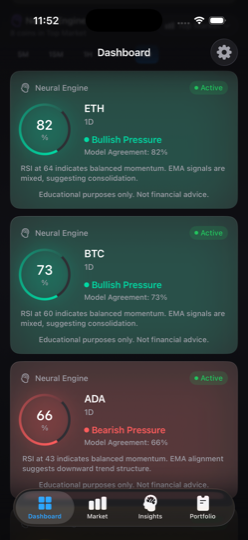
Raw price charts and indicators are powerful, but they require significant expertise to interpret correctly. This is where AI-powered analysis changes the game for portfolio tracking. Instead of learning to read every indicator manually, an AI assistant can analyze the chart patterns and provide plain-language explanations of what is happening and why it matters for your holdings.
How On-Device AI Analysis Works
Modern AI models, particularly Apple's Core ML framework, can run sophisticated machine learning models directly on your phone's neural engine. This means the AI can analyze candlestick patterns, indicator readings, volume trends, and multi-timeframe signals without sending your portfolio data to any external server.
When you view a chart for one of your holdings, the AI can tell you things like:
- Whether the current trend is bullish, bearish, or neutral based on multiple technical signals
- If key indicators like RSI are showing overbought or oversold conditions
- Whether the price is approaching significant support or resistance levels
- How the current price action compares to recent historical patterns
- Whether volume is confirming or contradicting the price movement
Why On-Device AI Matters for Privacy
Cloud-based AI analysis means sending your chart data, your holdings, and your viewing patterns to a remote server. The AI company then knows which coins you hold, how much you have, and what you are paying attention to. That is a privacy risk most people do not consider.
On-device AI eliminates this entirely. The model runs on your phone's neural engine, processes the data locally, and produces results without any external communication. You get the benefit of AI-powered insights with zero privacy cost. No server logs your queries. No database stores your analysis requests. No company builds a profile of your crypto interests.
AI as a Learning Tool
The best use of AI-powered analysis is not as a trading signal generator, but as an educational companion. When the AI explains that RSI is at 75 and the price is near resistance, it teaches you to recognize those conditions yourself. Over time, you build your own pattern recognition skills while having the AI as a knowledgeable second opinion.
Once you have connected your first exchange and are comfortable with the process, it is time to add the rest. Having all your exchanges connected gives you a unified view of your entire crypto portfolio—the complete picture that makes informed decision-making possible.
Why Multi-Exchange Monitoring Matters
If you hold ETH on both Coinbase and Kraken, your total ETH position is the sum of both. Without a unified tracker, you might think you have a smaller position than you actually do. Or worse, you might not realize how concentrated you are in a single asset across multiple exchanges. Multi-exchange monitoring reveals your true allocation.
It also lets you compare conditions across exchanges. Prices for the same asset can occasionally differ between platforms (this is the basis of arbitrage). While the differences are usually small, being able to see your holdings across all exchanges on a single screen saves significant time compared to logging into each one separately.
Setting Up Multiple Connections
The process for adding a second or third exchange is identical to adding your first. Create a read-only API key on the exchange, paste it into your tracker app, and verify the connection. A good portfolio tracker will clearly label which holdings come from which exchange while also showing your combined totals.
For each exchange you add, keep these organization tips in mind:
- Use descriptive API key labels on each exchange (e.g., "ChartScope Tracker - Read Only") so you can identify them later
- Document which keys you have created and when, so you know when to rotate them
- Verify the data after each connection by cross-referencing your app's reported balances with each exchange's dashboard
- Delete old API keys if you switch to a different tracking app
Multi-Exchange Setup Checklist
- All exchanges connected with read-only API keys
- Balances verified against each exchange's dashboard
- Total portfolio value matches the sum of all exchanges
- Allocation percentages reviewed for concentration risk
- API key labels are descriptive and identifiable
- A record exists of all active API keys and their creation dates
Setting up secure portfolio tracking is not a one-time task. Security is an ongoing practice, and there are several habits you should build into your routine to keep your portfolio tracking setup safe over time.
Rotate Your API Keys Regularly
Even with read-only permissions, it is good practice to rotate your API keys every 90 days. This limits the window of exposure if a key is somehow compromised. The process is simple: create a new key on the exchange, update it in your tracking app, then delete the old key from the exchange. It takes about two minutes per exchange and significantly reduces risk.
Review Connected App Permissions
Periodically log into each exchange and review your API keys under the API management section. Look for any keys you do not recognize, keys with excessive permissions, or keys that were created at times you do not remember. If anything looks suspicious, delete the key immediately and change your exchange password.
Keep Your Device Secure
If you are using an on-device portfolio tracker, your phone is your security perimeter. Keep your operating system updated, use a strong passcode (not just a 4-digit PIN), enable biometric authentication (Face ID or fingerprint), and never jailbreak or root a device that has access to your financial data. These are not optional steps—they are the foundation of your portfolio security.
Be Wary of Phishing
Once you are tracking your portfolio, you become a potential target for phishing. Be suspicious of emails claiming to be from exchanges that mention specific balances or holdings. Legitimate exchanges will never ask for your API keys via email. Always navigate directly to exchange websites by typing the URL rather than clicking links in emails.
Red Flags to Watch For
- A tracking app asking for trading or withdrawal API permissions
- An app that requires you to enter your exchange password (API keys are separate)
- Portfolio trackers that do not explain where and how they store your API keys
- Apps without a clear privacy policy explaining their data handling practices
- Emails or messages asking you to "verify" your API keys by clicking a link
Bringing It All Together
Tracking your crypto portfolio securely in 2025 comes down to a few core principles: use read-only API keys with the minimum necessary permissions, choose tools that process your data on-device rather than uploading it to cloud servers, connect all your exchanges for a unified view, and maintain ongoing security habits like key rotation and permission reviews.
The crypto industry continues to mature, and with that maturity comes better tooling for portfolio management. You no longer have to choose between convenience and privacy. Modern on-device solutions give you real-time portfolio tracking, multi-timeframe chart analysis, and AI-powered insights—all without your financial data ever leaving your phone.
The most important step is simply starting. Pick one exchange, create a read-only API key, connect it to a privacy-first tracker, and build from there. Once you see your portfolio data organized in one place with AI-powered analysis at your fingertips, you will wonder how you ever managed without it.
Track Your Crypto Portfolio Securely with ChartScope
ChartScope is a privacy-first iOS app that tracks your portfolio entirely on-device. Connect Binance, Coinbase, and Kraken with read-only API keys. Get AI-powered chart analysis powered by Apple Core ML—your data never leaves your phone. Free 3-day trial included.
Download on the App StorePortfolio Tracking for Tax Reporting in 2026: Why Accurate Records Are Non-Negotiable
Secure portfolio tracking isn't just about knowing your current balances — it's about maintaining the transaction history you'll need for tax reporting. In 2026, this is more important than ever: the EU's DAC8 directive requires crypto exchanges to automatically report user transaction data to the tax authorities of EU member states, effective from 2026. If your records don't match what the exchange reports, you have a problem.
What DAC8 Means for EU Users Tracking Their Portfolio
DAC8 (Directive on Administrative Cooperation) obliges European crypto exchanges to collect and report to national tax authorities:
- All crypto-to-fiat transactions (sales, deposits, withdrawals)
- Crypto-to-crypto swaps (in many jurisdictions, these are taxable disposals)
- Your acquisition cost data if the exchange has it (e.g., if you bought on that exchange)
- Annual summaries of gains and losses where the exchange can calculate them
This means your home tax authority will receive data about your exchange activity regardless of whether you report it. A secure, accurate portfolio tracker gives you the matching records to file correctly — and to contest any inaccuracies in what the exchange reported.
Cost Basis Tracking Across Multiple Exchanges
The most common portfolio tracking failure isn't security — it's cost basis fragmentation. If you've bought BTC on Binance, transferred it to a hardware wallet, then sold it on Kraken, no single exchange has your complete cost basis. You do. Key principles:
- Record every acquisition: Date, amount, price in your local fiat currency, exchange, and transaction fee (deductible in most jurisdictions)
- Track transfer events: Moving crypto between your own wallets is not a taxable event, but you need to document it to prove the asset's cost basis didn't change
- FIFO vs. LIFO vs. specific ID: Different jurisdictions require different cost basis methods. The UK uses HMRC's share identification rules; Belgium and France use FIFO; Romania allows specific identification. Your tracker needs to support your country's required method
- Staking and yield rewards: These are generally treated as income (at market value when received) rather than capital gains — they need a separate tax record from trading gains
Read-Only API Keys: Balancing Security and Tax Data Access
ChartScope's read-only API key architecture (permissions: read only, no trade or withdraw) gives you portfolio visibility without withdrawal risk. From a tax record perspective, the read-only connection pulls:
- Current balances and their fiat-equivalent values (for wealth tax calculations, relevant in Switzerland, Germany, and some cantons)
- Open orders and position history (useful for confirming acquisition dates)
- Price history for held assets (for mark-to-market calculations)
What it does not pull is full transaction history — for that, you'll want to export your complete trade history directly from each exchange (most provide CSV exports). ChartScope's portfolio view is for real-time education and analysis; your tax records need the full export.
Country-Specific Portfolio Tracking Requirements
Depending on where you're based, your portfolio tracking needs differ:
- Belgium: 30% flat tax on disposals — track every sale price, acquisition cost, and date. The FSMA may request records if your activity is flagged for review
- France: PFU 30% on net annual gains — the D2086 tax form requires transaction-level detail. The French tax authority pre-populates the form with DAC8 data from 2026 onward, which you must verify and correct if wrong
- Switzerland: Capital gains generally exempt for private investors, but wealth tax requires the CHF fair market value of all holdings on 31 December each year — your tracker must support year-end valuation snapshots
- Romania: ANAF requires disclosure of all transactions exceeding 200 RON gain per event on the D212 form — cost basis records per transaction are essential
- Germany: Gains on crypto held less than 12 months are taxable as income; after 12 months, gains are generally tax-free for private investors. Your tracker must record acquisition dates precisely
Disclaimer: This is educational information. Tax rules in all jurisdictions are subject to change. Consult a qualified tax advisor in your country for guidance on your specific situation and reporting obligations.
Important Disclaimer
This article is for educational purposes only and does not constitute financial advice, investment recommendations, or trading signals. Cryptocurrency markets are highly volatile and carry significant risk. You could lose some or all of your invested capital.
While this guide describes security best practices for portfolio tracking, no method is 100% secure. Always conduct your own research, follow the security guidelines of your chosen exchanges, and consult with qualified professionals for financial and security advice.
ChartScope is an educational tool designed to help you learn about cryptocurrency markets and track your portfolio. It does not provide financial advice. API key setup and security configuration are your responsibility.